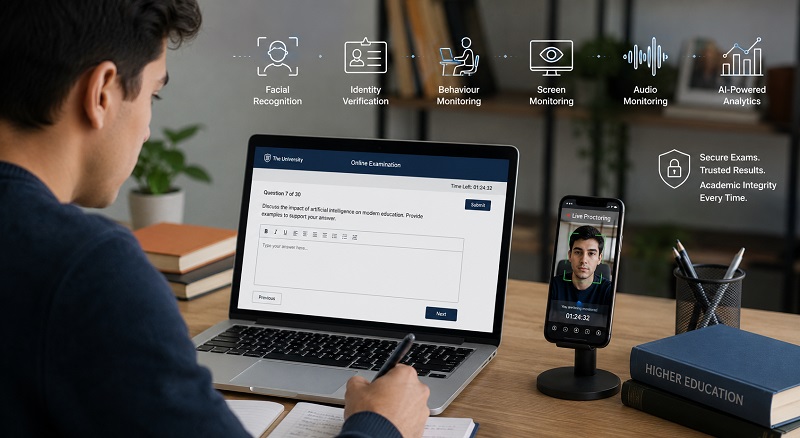
The way educational institutions deliver assessments has changed dramatically over the past few years. Universities, colleges, schools and professional certification providers increasingly rely on online and hybrid assessments to provide greater flexibility, support remote learning and reach larger student populations. While these digital assessment models offer significant advantages, they also introduce new challenges in maintaining examination integrity.
As online learning becomes more widespread, protecting assessments from academic misconduct has become a strategic priority. Traditional examination halls naturally limit many forms of cheating through physical supervision, but remote assessments require technology to create a similar level of confidence. Educational institutions must ensure that students complete assessments fairly while preserving the credibility of qualifications and maintaining trust among employers, accreditation bodies and learners.
Two technologies frequently discussed in this context are lockdown browsers and AI-powered proctoring. Although these solutions are often compared, they are designed to solve different aspects of online exam security. A lockdown browser restricts what students can do on their examination device, while AI proctoring monitors the assessment environment, verifies identity and identifies behaviours that may indicate academic misconduct.
Rather than viewing these technologies as competitors, institutions should evaluate how each contributes to examination integrity. In many cases, the strongest assessment security comes from combining browser restrictions with AI-powered monitoring to create multiple layers of protection.
This guide compares browser lockdown vs AI proctoring, explains how each technology works, outlines their strengths and limitations, and helps educational institutions choose the right approach for secure online exams in 2026 and beyond.
What Is a Lockdown Browser?
A lockdown browser is specialised exam software designed to restrict the functionality of a student’s computer while an online assessment is in progress. Its primary purpose is to prevent candidates from accessing unauthorised digital resources that could provide unfair assistance during an examination.
Instead of allowing unrestricted access to the operating system and web browser, the software creates a controlled examination environment where only approved activities are permitted. Students can access their assessment through the institution’s Learning Management System (LMS), but many standard computer functions become unavailable until the examination has been completed.
How a Lockdown Browser Works
When a student launches an examination through a lockdown browser, the application temporarily takes control of the device and limits activities that could compromise assessment security.
Depending on the software being used, restrictions may include:
- Blocking access to additional browser tabs.
- Preventing navigation to external websites.
- Disabling copy and paste functions.
- Blocking keyboard shortcuts.
- Preventing screen capture or printing.
- Restricting access to other applications.
- Preventing file downloads during the examination.
- Disabling browser extensions that may assist students.
These controls reduce opportunities for students to search the internet or access digital reference materials using the examination device.
Restricting Browser Functions
One of the primary benefits of a lockdown browser is its ability to create a controlled browsing environment. Students remain focused on the assessment platform because the software blocks navigation away from authorised pages.
This prevents candidates from opening search engines, accessing online textbooks or consulting websites that may contain examination answers.
Blocking Copy and Paste
Many online assessments require students to demonstrate independent knowledge rather than simply transferring information from another source. Lockdown browsers typically disable copy and paste functionality, making it more difficult to copy questions into external applications or paste prepared answers into the examination.
Preventing Tab Switching
Switching between browser tabs is one of the simplest ways students may attempt to access unauthorised resources during an online assessment. Lockdown browsers prevent additional tabs from opening and restrict navigation away from the examination interface, helping institutions maintain greater control over browser activity.
Restricting Printing and Screenshots
Many lockdown browsers also disable screen capture tools and printing functions. This reduces the likelihood of examination content being copied, shared or distributed during or after an assessment.
For institutions delivering high-value examinations or professional certification programmes, protecting assessment content is just as important as monitoring student behaviour.
Limiting Access to Other Applications
Modern operating systems make it easy for users to switch between applications with a single keyboard shortcut. During an assessment, students could potentially open messaging platforms, AI applications, calculators or document editors without leaving the examination browser.
A lockdown browser helps minimise this risk by restricting access to unauthorised software while the assessment is running.
Typical Examination Scenarios
Lockdown browsers are commonly used in:
- University online examinations.
- College assessments.
- Professional certification tests.
- School digital examinations.
- Corporate compliance assessments.
- Distance learning programmes.
They are particularly useful when institutions need to restrict access to digital resources while allowing students to complete assessments on their own computers.
Advantages of Lockdown Browsers
For many educational institutions, lockdown browsers provide an effective first layer of online exam security. They are relatively straightforward to deploy and integrate with most Learning Management Systems.
Key advantages include:
- Simple implementation for many online assessments.
- Reduces opportunities to search the internet during exams.
- Restricts browser activity and application switching.
- Protects assessment content from copying or printing.
- Integrates with many LMS platforms.
- Supports secure digital assessments without requiring significant changes to existing examination processes.
Limitations of Lockdown Browsers
Although lockdown browsers provide valuable browser monitoring capabilities, they do not offer complete examination security on their own. Their primary focus is controlling the examination device rather than observing the student or their surroundings.
For example, a lockdown browser cannot determine:
- Who is actually taking the examination.
- Whether another person is present in the room.
- If a student is using a second smartphone or tablet.
- Whether voice assistants are being used.
- If external assistance is being provided off-camera.
- Whether unusual behaviour suggests potential academic misconduct.
As generative AI and secondary devices become increasingly common, many institutions are recognising that browser restrictions alone cannot address every modern assessment security challenge. This has led to growing interest in AI-powered online proctoring solutions that monitor not only the computer, but also the assessment environment and student behaviour.
What Is AI Proctoring?
AI proctoring is an advanced online assessment monitoring solution that combines artificial intelligence with human oversight to help educational institutions maintain examination integrity. Unlike a lockdown browser, which focuses primarily on restricting computer activity, AI proctoring monitors the entire assessment environment, verifying student identity, observing behaviour and collecting evidence that can be reviewed by authorised examination staff.
As universities continue expanding online learning and hybrid education, AI-powered proctoring has become an important component of modern AI exam security. Rather than replacing lecturers or invigilators, artificial intelligence automates routine monitoring tasks and highlights potential incidents, allowing human reviewers to make informed academic decisions.
This combination of technology and human expertise enables institutions to conduct secure online exams at scale while maintaining fairness for genuine students.
AI-Powered Online Assessment Monitoring
Modern AI proctoring platforms continuously analyse multiple data sources throughout an examination. Instead of relying on a single security measure, they evaluate student activity from several perspectives, creating a comprehensive picture of how the assessment was completed.
Depending on institutional requirements, AI-powered online assessment monitoring may include:
- Facial recognition.
- Identity verification.
- Behaviour monitoring.
- Screen monitoring.
- Browser monitoring.
- Audio monitoring.
- AI-powered incident detection.
- GPS verification where appropriate.
- Post-exam review dashboards.
Each layer contributes additional evidence, helping examination teams investigate potential incidents fairly and consistently.
Remote Invigilation
Remote invigilation enables students to complete examinations from home or other approved locations without compromising examination integrity. AI-powered systems monitor the assessment environment while allowing institutions to maintain consistent standards regardless of where students are located.
This flexibility has become particularly valuable for distance learning providers, international universities and professional certification organisations that assess candidates across multiple countries and time zones.
Facial Recognition
Facial recognition technology helps verify that the registered student is the individual taking the examination. Before the assessment begins, the system compares the student’s live image with a previously registered profile photograph or institutional identity record.
Some AI proctoring platforms perform additional identity checks during the examination to ensure that the same candidate remains present throughout the session, significantly reducing the risk of impersonation.
Identity Verification
Identity verification extends beyond facial recognition alone. Institutions may combine secure login credentials, student records, identification documents and verification codes to create multiple authentication layers before an assessment begins.
Continuous verification throughout the examination further strengthens online exam security by ensuring that the authorised student remains the active participant for the duration of the assessment.
Behaviour Monitoring
One of the most significant advantages of AI-powered proctoring is its ability to analyse behavioural patterns during an assessment. Artificial intelligence evaluates activities that may indicate unusual or suspicious behaviour while avoiding unnecessary interruptions for legitimate students.
Examples include:
- Repeatedly looking away from the screen.
- Leaving the examination area.
- Multiple people appearing in camera view.
- Covering the webcam.
- Frequent movement towards another device.
- Unexpected interruptions.
These observations do not automatically indicate academic misconduct. Instead, they provide contextual information that helps examination staff conduct balanced and evidence-based reviews.
Screen Monitoring
Screen monitoring enables institutions to observe activity occurring on the examination device itself. Depending on examination policies, this may include screenshots, browser activity or application monitoring to identify attempts to access unauthorised websites, AI tools or external resources.
As generative AI becomes increasingly accessible, screen monitoring provides valuable evidence when reviewing potential assessment irregularities.
Audio Monitoring
Audio monitoring adds another important layer of online exam security by detecting voices, conversations or unexpected sounds that may suggest external assistance during an examination.
Rather than requiring invigilators to review hours of recordings manually, AI highlights unusual audio events for further investigation.
AI-Powered Incident Detection
Artificial intelligence continuously analyses assessment data in real time, identifying patterns that fall outside expected examination behaviour. Instead of reviewing every second of recorded footage, examination officers receive prioritised incidents that require attention.
This significantly improves efficiency while making large-scale online assessments far more manageable.
Post-Exam Review Dashboards
Modern AI proctoring platforms typically provide detailed dashboards that summarise assessment activity after an examination has been completed. These dashboards allow lecturers and examination officers to review flagged incidents alongside supporting evidence before making academic decisions.
Rather than relying solely on automated scoring, institutions retain full control over how incidents are interpreted and resolved.
Learning Management System (LMS) Integration
Most leading AI proctoring solutions integrate directly with popular Learning Management Systems. This enables institutions to schedule assessments, authenticate students, launch examinations and manage assessment records from within their existing educational platforms.
LMS integration simplifies administration while reducing manual processes for academic and IT teams.
Browser Lockdown vs AI Proctoring: Understanding the Difference
Although lockdown browsers and AI proctoring are frequently compared, they address different aspects of online assessment security. One controls what students can do on their examination device, while the other monitors the assessment process itself.
Understanding these differences helps institutions select the most appropriate solution based on their examination requirements rather than assuming one technology completely replaces the other.
Exam Security
A lockdown browser creates a secure computing environment by preventing access to unauthorised applications and websites. AI proctoring extends this protection by monitoring the student’s identity, behaviour and examination surroundings throughout the assessment.
For institutions conducting high-stakes online examinations, combining both technologies often delivers the strongest level of assessment security.
Student Authentication
Lockdown browsers generally assume that the person logging into the examination is the authorised student. AI proctoring actively verifies identity before and, in many cases, throughout the assessment using facial recognition and identity verification technologies.
Identity Verification
Continuous identity verification represents one of the most significant differences between the two approaches. Browser restrictions cannot determine who is sitting in front of the computer, whereas AI-powered proctoring provides ongoing authentication throughout the examination session.
| Assessment Feature | Lockdown Browser | AI Proctoring |
| Restricts browser activity | ✔ | ✔ |
| Blocks tab switching | ✔ | ✔ |
| Student authentication | Limited | ✔ |
| Continuous identity verification | ✘ | ✔ |
| Facial recognition | ✘ | ✔ |
| Behaviour monitoring | ✘ | ✔ |
While both technologies contribute to secure online exams, AI-powered proctoring provides broader visibility into the assessment environment. In the next section, we compare browser lockdown and AI proctoring in greater detail, examining behaviour monitoring, AI cheating detection, accessibility, scalability, reporting and institutional deployment.
Browser Lockdown vs AI Proctoring: A Detailed Comparison
Choosing the right online assessment solution involves more than comparing feature lists. Educational institutions need to consider their assessment objectives, student population, available resources and long-term digital learning strategy. While lockdown browsers and AI-powered proctoring both contribute to secure online exams, they address different aspects of assessment security.
The following comparison highlights where each technology performs best and why many institutions are choosing to combine both solutions rather than relying on a single approach.
Behaviour Monitoring
A lockdown browser cannot observe student behaviour because it only controls activity on the examination device. AI-powered proctoring continuously analyses behavioural patterns throughout the assessment, helping institutions identify unusual activity without interrupting legitimate candidates.
Examples include repeated glances away from the screen, leaving the examination area, multiple people appearing on camera or prolonged periods where the student’s face is no longer visible.
AI Cheating Detection
Generative AI has changed the way students can access information during assessments. While a lockdown browser helps prevent students from opening AI websites on the examination device, it cannot detect AI usage from secondary devices such as smartphones or tablets.
AI-powered proctoring takes a broader approach by combining screen monitoring, browser monitoring, behaviour analysis and identity verification to identify activities that may indicate unauthorised AI assistance.
Browser Monitoring
Both technologies support browser monitoring, although they do so differently.
- Lockdown browsers prevent students from leaving the examination environment by blocking browser tabs, websites and keyboard shortcuts.
- AI proctoring records browser activity and combines it with other evidence to provide a more complete understanding of student behaviour.
Together, these capabilities provide stronger online exam security than either solution alone.
Ease of Deployment
Lockdown browsers are generally straightforward to deploy because they focus primarily on restricting computer functions. Many institutions already integrate them with their Learning Management Systems.
AI-powered proctoring requires additional configuration, including identity verification workflows, camera permissions and monitoring settings. However, modern cloud-based solutions have made deployment significantly easier than in previous years.
Student Experience
Student experience plays an important role in assessment success. Complex software, confusing instructions or technical difficulties can increase examination stress and reduce confidence.
Well-designed AI proctoring platforms typically provide guided onboarding, clear instructions and automated system checks before examinations begin. Lockdown browsers are generally simple to launch but may provide limited guidance if technical issues occur.
Accessibility
Educational institutions have a responsibility to ensure digital assessments remain accessible to all learners, including those requiring reasonable accommodations.
Modern AI-powered proctoring platforms increasingly include accessibility features that support diverse learning requirements while maintaining examination integrity. Institutions should evaluate accessibility alongside security when selecting an assessment platform.
Scalability
Large universities may conduct thousands of online examinations within a single assessment period. AI-powered automation significantly reduces the administrative workload associated with monitoring large student populations.
Instead of reviewing every examination manually, academic staff receive prioritised incidents supported by evidence, enabling faster and more consistent review processes.
Reporting and Analytics
Reporting capabilities have become increasingly valuable for examination offices and academic integrity teams. AI-powered proctoring platforms typically provide detailed dashboards showing examination activity, flagged incidents, identity verification results and behavioural trends.
These reports help institutions investigate potential misconduct while also improving future assessment design.
Operational Costs
Cost should be evaluated in terms of overall value rather than software licensing alone. Although AI-powered proctoring may involve higher initial investment, it can significantly reduce manual invigilation requirements and improve operational efficiency for institutions managing large assessment programmes.
Human Review Remains Essential
Artificial intelligence should support—not replace—academic judgement. Reputable AI-powered proctoring platforms provide evidence for human reviewers rather than making automatic disciplinary decisions.
This ensures that every flagged incident is evaluated within the context of institutional policies and individual circumstances.
Large University Deployments
Universities with thousands of students often require solutions capable of supporting multiple simultaneous examinations across different faculties, campuses and geographical locations.
Cloud-based AI proctoring platforms provide the scalability needed for these environments while integrating with existing Learning Management Systems and examination workflows.
Comprehensive Feature Comparison
| Feature | Lockdown Browser | AI Proctoring |
| Browser restrictions | ✔ | ✔ |
| Blocks tab switching | ✔ | ✔ |
| Facial recognition | ✘ | ✔ |
| Continuous identity verification | ✘ | ✔ |
| Behaviour monitoring | ✘ | ✔ |
| Screen monitoring | Limited | ✔ |
| Browser monitoring | ✔ | ✔ |
| Audio monitoring | ✘ | ✔ |
| AI-powered incident detection | ✘ | ✔ |
| Remote invigilation | Limited | ✔ |
| Review dashboard | Basic | Comprehensive |
| LMS integration | ✔ | ✔ |
| Large-scale deployment | Good | Excellent |
| Evidence-based review | Limited | ✔ |
Can Both Technologies Work Together?
Absolutely. Many universities and professional certification providers now combine lockdown browsers with AI-powered proctoring to create multiple layers of online exam security.
In this approach, the lockdown browser prevents students from accessing unauthorised digital resources on the examination device, while AI-powered proctoring monitors identity, behaviour and the assessment environment.
This layered strategy provides stronger protection against modern forms of academic misconduct, including AI-assisted cheating, secondary device usage and impersonation.
By combining browser restrictions with intelligent monitoring, institutions create a more secure assessment environment without significantly increasing administrative complexity.
Which Solution Is Best for Different Institutions?
There is no single solution that suits every educational organisation. The most appropriate technology depends on assessment objectives, student numbers and institutional priorities.
Universities
Large universities delivering high-stakes online examinations generally benefit most from combining lockdown browsers with AI-powered proctoring. This approach provides comprehensive assessment security while supporting large student populations.
Colleges
Colleges offering blended learning programmes often require flexible solutions that integrate easily with existing Learning Management Systems. AI-powered proctoring provides additional confidence for remote assessments without disrupting established teaching practices.
Schools
Schools may choose either technology depending on examination type, student age and available technical resources. Simpler assessments may only require browser restrictions, while higher-stakes examinations benefit from AI-assisted monitoring.
Professional Certification Providers
Certification organisations frequently assess candidates from multiple regions and countries. AI-powered remote invigilation provides consistent examination standards while reducing the need for physical testing centres.
Corporate Training Organisations
Businesses delivering compliance training or professional certification programmes can improve examination integrity by combining secure browser controls with intelligent identity verification and behaviour monitoring.
Distance Learning Institutions
Institutions delivering fully online education rely heavily on remote invigilation. AI-powered proctoring enables them to maintain examination integrity regardless of where students are located while supporting flexible digital learning.
Choosing the Right Online Assessment Platform
Selecting an online assessment platform is no longer just an IT decision. It directly affects examination integrity, student experience, operational efficiency and institutional reputation. As artificial intelligence continues to influence education, universities and training providers should evaluate assessment platforms based on both their current requirements and their ability to adapt to future challenges.
Rather than focusing on a single feature, institutions should assess the platform as a complete ecosystem that supports secure online exams, efficient administration and a positive student experience.
AI Capabilities
Modern assessment platforms should leverage artificial intelligence to improve examination security without replacing human judgement. AI can automate repetitive monitoring tasks, identify unusual behaviour and highlight incidents for review, allowing examination staff to concentrate on meaningful cases rather than manually reviewing every assessment.
Browser Restrictions
Browser lockdown remains an important security feature. Institutions should ensure the platform can restrict unauthorised websites, prevent tab switching, disable copy-and-paste functions and limit access to external applications during examinations.
Scalability
Assessment requirements often change over time. A suitable platform should support anything from small classroom quizzes to thousands of simultaneous online examinations without compromising performance or security.
Learning Management System Integration
Seamless integration with existing Learning Management Systems simplifies administration and reduces manual work for lecturers and IT teams. A well-integrated platform enables educators to schedule assessments, authenticate students and review examination results within familiar systems.
Student Privacy and Compliance
Educational institutions must ensure assessment technologies comply with relevant privacy legislation and institutional policies. Students should understand what information is collected, how it is stored and how examination data is used during the review process.
Reporting and Analytics
Comprehensive reporting enables examination offices to investigate incidents efficiently while identifying long-term trends. Analytics can also help institutions improve assessment design, identify recurring technical issues and strengthen future examination processes.
Technical Support
Reliable technical support is essential during examination periods. Institutions should evaluate vendor responsiveness, onboarding resources, system documentation and availability of live assistance for both administrators and students.
Accessibility
Online assessments should be accessible to all students, including those requiring reasonable accommodations. Institutions should consider compatibility with assistive technologies, flexible examination settings and accessibility standards when evaluating assessment platforms.
Ease of Implementation
The most effective assessment platforms are those that fit naturally into existing educational workflows. Straightforward implementation, intuitive interfaces and minimal disruption to academic staff encourage successful adoption across faculties and departments.
Future Readiness
Technology evolves rapidly. Institutions should select platforms capable of adapting to emerging challenges such as AI-generated answers, increasingly sophisticated assessment methods and evolving cybersecurity requirements.
Why AI Exam Security Is Becoming the New Standard
Artificial intelligence is transforming education at every level. Students increasingly use AI tools for research, revision, programming assistance and academic writing. While these technologies offer significant educational benefits, they also introduce new challenges for secure online exams.
Generative AI has made it possible to produce high-quality responses within seconds. As a result, educational institutions can no longer rely solely on traditional plagiarism detection or browser restrictions to maintain examination integrity.
Modern AI exam security focuses on understanding the entire assessment process rather than analysing only the final submission. Behaviour analysis, identity verification, screen monitoring and AI-powered incident detection provide institutions with stronger evidence when reviewing potential academic misconduct.
At the same time, online learning and hybrid education continue to expand across higher education. Institutions require scalable assessment solutions capable of supporting students regardless of their location while maintaining consistent examination standards.
Rather than replacing educators, AI-powered monitoring enables academic staff to review evidence more efficiently, improve consistency and reduce the administrative burden associated with large-scale digital assessments.
Benefits of AI Proctoring Beyond Browser Restrictions
While lockdown browsers remain valuable for controlling activity on the examination device, AI-powered proctoring provides a much broader approach to online assessment security.
- Strengthens academic integrity across online assessments.
- Provides reliable student authentication before examinations begin.
- Supports continuous identity verification throughout assessments.
- Monitors behaviour that may indicate academic misconduct.
- Combines screen, browser and audio monitoring.
- Uses AI-powered incident detection to reduce manual review time.
- Provides evidence-based review dashboards for examination teams.
- Supports large-scale online examinations across multiple locations.
- Integrates with Learning Management Systems.
- Provides greater flexibility for remote and hybrid learning.
- Improves operational efficiency for academic and IT teams.
- Creates future-ready assessment environments capable of adapting to new technologies.
Conclusion
Choosing between a lockdown browser and AI-powered proctoring should not be viewed as an either-or decision. Each technology addresses different aspects of online assessment security, and both contribute to protecting academic integrity.
Lockdown browsers remain highly effective for restricting browser activity, preventing access to unauthorised resources and securing the examination device. However, they cannot verify student identity, observe behaviour or detect many of the modern risks associated with AI-generated answers and secondary devices.
AI-powered proctoring complements browser restrictions by monitoring the assessment environment through identity verification, facial recognition, behaviour analysis, screen monitoring, audio monitoring and AI-powered incident detection. This broader approach provides institutions with evidence-based insights that support fair and consistent examination review.
As digital education continues to evolve, the most successful institutions will adopt layered assessment security strategies that combine intelligent technology with thoughtful assessment design, clear academic policies and experienced human oversight. By doing so, they can confidently deliver secure online exams while supporting innovation in teaching and learning.
Secure Your Online Assessments with The Invigilator
Whether your institution delivers assessments on campus, remotely or through hybrid learning, maintaining examination integrity has never been more important. The Invigilator provides AI-powered remote invigilation that combines intelligent identity verification, behaviour monitoring and secure online assessment technology to help universities, colleges, schools and training providers conduct examinations with confidence.
If you are evaluating online assessment solutions or planning your next generation of secure digital exams, contact The Invigilator to learn how our AI-powered remote invigilation platform can help your institution deliver secure, scalable and accessible online assessments while maintaining academic integrity in an AI-driven education landscape.
Frequently Asked Questions
1. What is the difference between a lockdown browser and AI proctoring?
A lockdown browser restricts what students can do on their examination device by blocking websites, applications and browser functions. AI proctoring goes further by verifying student identity, monitoring behaviour, analysing screen activity and detecting potential incidents during online assessments.
2. Is a lockdown browser enough for secure online exams?
A lockdown browser provides an important first layer of security by restricting access to digital resources. However, it cannot verify who is taking the exam or detect the use of secondary devices or external assistance. Many institutions combine it with AI proctoring for greater examination integrity.
3. Can AI proctoring detect AI-generated cheating?
AI proctoring does not determine whether an answer was written by AI. Instead, it monitors student behaviour, screen activity, browser usage and identity throughout the assessment, helping institutions identify behaviour that may indicate unauthorised AI assistance.
4. Can lockdown browsers and AI proctoring be used together?
Yes. Many universities and certification providers use both technologies together. A lockdown browser restricts computer activity, while AI proctoring monitors the student and assessment environment, providing a more comprehensive online exam security solution.
5. How does AI proctoring verify student identity?
AI-powered proctoring platforms typically use facial recognition, identity verification, secure authentication and continuous monitoring to confirm that the registered student remains present throughout the examination.
6. Which solution is better for universities?
Large universities conducting high-stakes online assessments often benefit from combining browser lockdown with AI-powered proctoring. This layered approach improves academic integrity while supporting large student populations and remote assessments.
7. Does AI proctoring replace human invigilators?
No. AI proctoring assists human invigilators by identifying potential incidents and presenting evidence for review. Final decisions regarding academic integrity always remain with authorised academic staff.
8. What should institutions consider when choosing online assessment software?
Institutions should evaluate browser restrictions, AI capabilities, identity verification, scalability, Learning Management System (LMS) integration, accessibility, reporting, privacy compliance, technical support and future readiness before selecting an assessment platform.