Proactive Protection in Remote Learning: How Online Proctoring Tools Minimise Risk
The growth of remote education has transformed access to learning globally. But alongside this transformation come new vulnerabilities. From academic dishonesty to identity fraud and lack of monitoring, remote learning opens the door to various security and integrity risks. This is where online proctoring tools step in to fill the gap, offering institutions and educators robust solutions for secure assessments.
This article explores the primary remote learning challenges and how advanced online proctoring tools like The Invigilator App can effectively address them, ensuring credible, accessible, and secure academic environments.
1. Identity Fraud: Who Is Really Taking the Exam?
One of the biggest concerns in remote learning is verifying that the correct student is completing the assessment. Traditional logins are easily compromised, and without in-person checks, impersonation can go undetected.
Solution with Proctoring Tools:
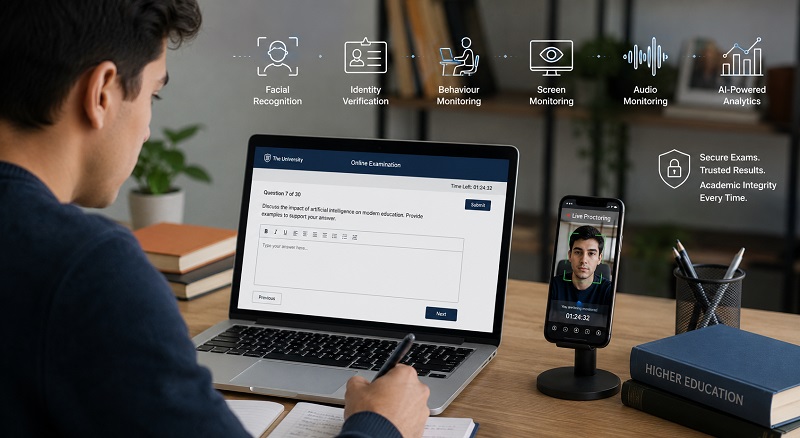
- Facial recognition and biometric checks confirm student identity.
- Two-step or multi-factor authentication ensures only authorised users access the exam.
- The Invigilator App uses facial recognition and biographical data to match users with institutional records.
2. Unsupervised Environments and Lack of Monitoring
Unlike traditional exams, remote assessments often occur without invigilators present. This raises questions about whether students may seek outside help, use unauthorised resources, or collaborate with peers.
Solution with Proctoring Tools:
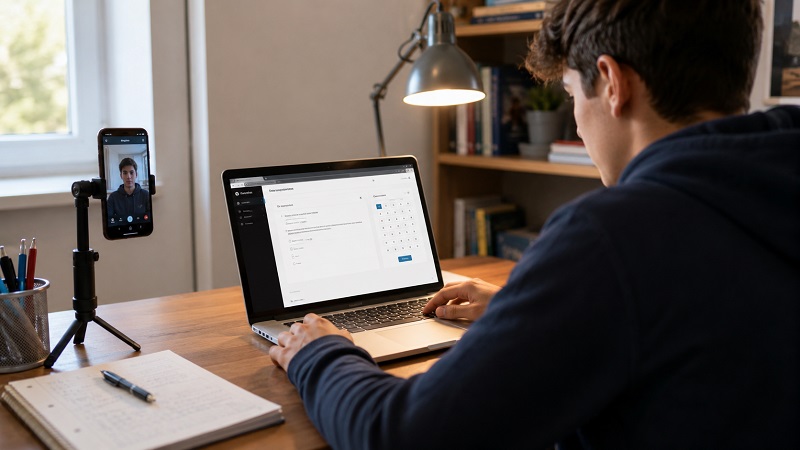
- Live or AI-powered video monitoring detects unusual activity.
- Audio detection flags conversations or external noises.
- Screen and webcam recordings ensure behaviour is monitored and reviewed.
- The Invigilator App uses low-data video and audio monitoring, ideal for South African environments with limited connectivity.
3. Cheating with Online Resources or Devices
In unsupervised settings, students may access other websites, use secondary devices, or rely on AI tools like chat assistants to generate answers.
Solution with Proctoring Tools:
- Browser lockdown features prevent students from navigating away during the exam.
- AI algorithms track mouse movement and browser behaviour.
- The Invigilator App flags behaviour like switching tabs, device detection, and access to external resources during an exam.
4. Plagiarism and Collusion in Submissions
With take-home assessments and assignments becoming more common, plagiarism has become a key issue. Students may copy from each other, the internet, or AI-generated content.
Solution with Proctoring Tools:
- Plagiarism detection software compares submitted scripts.
- Time-stamped submissions verify when and how content was added.
- The Invigilator App compares submissions across students to detect similarities and identify copying trends.
5. Proxy Test-Taking and Outsourcing
Some students may pay others to write or sit for exams on their behalf, especially in unmonitored settings.
Solution with Proctoring Tools:
- Geo-location tracking verifies that students are taking tests at approved locations.
- Random photo checks or live invigilation ensures consistent identity throughout the session.
- The Invigilator App includes GPS tracking to confirm that the registered user is at the designated location.
6. Privacy and Data Protection Concerns
A growing concern in South Africa and globally is how student data is collected and stored, especially with AI-based tools involved.
Solution with Proctoring Tools:
- Data encryption and secure servers protect sensitive information.
- Only relevant academic data is captured, with privacy policies in place.
- The Invigilator App complies with POPIA regulations, ensuring ethical handling of personal data.
7. Lack of Internet and Device Accessibility
Many South African students face technical barriers to remote learning, including unstable internet and limited access to high-end devices.
Solution with Proctoring Tools:
- Low-data solutions reduce bandwidth requirements while maintaining monitoring integrity.
- Mobile-first apps make exams accessible on smartphones.
- The Invigilator App is designed to work on entry-level smartphones and supports offline submissions when needed.
8. Mental Health and Student Stress
Surveillance-based proctoring can feel invasive and may increase anxiety, especially during high-stakes exams.
Solution with Proctoring Tools:
- Transparent privacy policies and user-friendly design reduce intimidation.
- Asynchronous proctoring allows students to complete assessments in a familiar environment.
- The Invigilator App prioritises student dignity while enforcing exam regulations.
9. Lack of Institutional Oversight and Analytics
Without physical presence, institutions often struggle to gather meaningful exam insights or maintain transparent records.
Solution with Proctoring Tools:
- Detailed reporting dashboards provide analytics on behaviour, timing, and patterns.
- Invigilators and lecturers can review flagged behaviour post-assessment.
- The Invigilator App provides clear logs of student activity for every test.
10. Inconsistent Policies and Enforcement
Different educators may apply remote exam rules inconsistently, leading to unfairness or legal challenges.
Solution with Proctoring Tools:
- Platform-wide rules standardise the proctoring process across departments and faculties.
- The Invigilator App allows custom configurations while maintaining a consistent framework for enforcement and documentation.
Remote learning has opened exciting pathways to education, especially in South Africa, where accessibility and affordability are major concerns. But without adequate safeguards, its credibility could suffer. The good news is that tools like The Invigilator App offer a comprehensive way to close the integrity gap, offering features that protect student privacy, ensure fairness, and uphold academic standards.
By tackling these risks head-on, online proctoring tools enable secure assessments, and future-proof remote learning environments for educational institutions across the country.
Looking to secure your institution’s remote assessments?
👉 Visit The Invigilator App Contact Page to find out how we can help.
Frequently Asked Questions (FAQs)
1. What is an online proctoring tool?
An online proctoring tool is software that monitors students during digital assessments to ensure academic integrity and prevent cheating.
2. How does The Invigilator App verify student identity?
It uses facial recognition and biographical data to match students to their institutional records.
3. Can students cheat during online exams?
Without proctoring, it is possible, but tools like The Invigilator App use AI and monitoring to detect and prevent dishonest behaviour.
4. Is online proctoring data secure?
Yes, reputable tools like The Invigilator App follow data protection laws and use encrypted servers to protect student privacy.
5. What happens if a student loses internet connection?
The Invigilator App allows for low-data use and supports offline submissions when necessary.
6. Does proctoring software invade student privacy?
Modern proctoring tools are designed to be non-invasive and transparent, focusing only on assessment integrity.
7. How are suspicious activities flagged during remote exams?
AI detects and logs abnormal behaviour such as background noise, multiple faces, or tab switching.
8. Can online proctoring be used for assignments too?
Yes, The Invigilator App supports identity checks and plagiarism detection for assignment submissions.